Digital and media access is essential for full participation in today’s church life. From livestreams and online worship to newsletters, event pages, presentations, and social media, digital communication is one of the primary ways people stay connected. When digital content is inaccessible, disabled people may miss vital information, feel excluded, or be unable to participate in worship and community life.
This page provides guidance for making your digital spaces, media, and online communication accessible, welcoming, and usable for all.
Why Digital Access Matters
Digital access is more than a technical feature — it is a form of hospitality. Many disabled people rely on online formats, captions, transcripts, screen readers, or alternative navigation methods to participate fully.
When digital content isn’t accessible, people may experience:
- Unable to join online worship because captions or transcripts are missing
- Difficulty accessing information due to low contrast or small fonts
- Confusion or frustration when websites are hard to navigate
- Feeling left out when events are announced only on platforms they cannot access
- Barriers to sign-ups, forms, and ministry participation
Accessible digital content ensures that everyone can stay informed, engaged, and connected.

Principles for Accessible Digital & Media Content
These principles apply to livestreams, videos, websites, newsletters, PDFs, social media, and digital presentations.
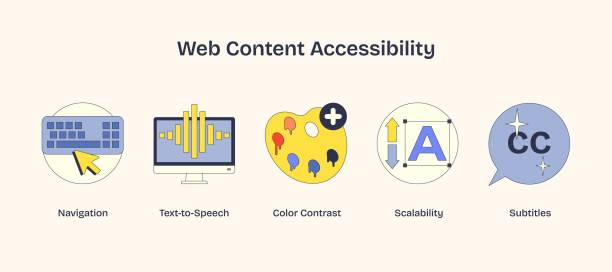
- Multiple formats: Provide captions, transcripts, and alternative text (alt-text).
- High contrast & readable fonts: Avoid small text and low-contrast color combinations.
- Clear structure: Use headings, lists, and simple layout for easier navigation.
- Keyboard navigation: Ensure that menus, forms, and links can be accessed without a mouse.
- Accessible PDFs & documents: Use tagged PDFs and readable text rather than images of text.
- Consistent communication: Post essential information in multiple places, not only social media.
Your goal is to reduce friction and increase clarity so people can access content regardless of ability or device.
Web Content Accessibility Guidelines (WCAG):
Pour Principles
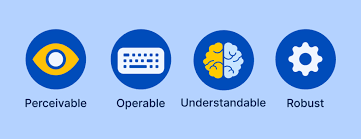
P: Preceivable
Information and user interface components must be presentable to users in ways they can perceive.
- This means that users must be able to perceive the information being presented (it can’t be invisible to all of their senses)
O: Operable
User interface components and navigation must be operable.
- This means that users must be able to operate the interface (the interface cannot require interaction that a user cannot perform)
U: Understandable
Information and the operation of user interface must be understandable.
- This means that users must be able to understand the information as well as the operation of the user interface (the content or operation cannot be beyond their understanding)
R: Robust
Content must be robust enough that it can be interpreted reliably by a wide variety of user agents, including assistive technologies.
- This means that users must be able to access the content as technologies advance (as technologies and user agents evolve, the content should remain accessible)
Livestreaming & Video Accessibility
Livestreams and videos are central to many churches’ hybrid worship practices. Accessibility should be integrated from the start, not added later.
Make video content accessible by:
- Captions: Provide accurate real-time captions for livestreams and edited captions for archived videos.
- ASL interpretation: When possible, include interpretation in frame or offered upon request.
- Clear audio: Reduce background noise and ensure microphones are close enough for clean sound.
- Camera stability: Avoid shaky or rapid camera movements that can cause sensory discomfort.
- Simple visuals: Avoid busy transitions or flashing content that can create sensory overload or trigger seizures.
Online worship is often the primary way many disabled people participate — make it reliable, accessible, and predictable.

Website & Online Document Accessibility
Your website is one of the first ways people interact with your church. Ensuring it is accessible shows welcome before someone ever steps through your doors.
Best practices:
- Use alt-text for all images, including sermon graphics, banners, and event photos.
- Ensure high-color contrast between text and background.
- Use headings (H1, H2, H3) to organize content clearly.
- Provide descriptive link text (e.g. “Download bulletin” instead of “Click here”).
- Do not rely solely on PDFs; include HTML or plain-text versions when possible.
- Make sure your navigation is usable with keyboard-only access.
- Use a simple, predictable layout so users with cognitive disabilities can easily find what they need.
These practices support screen readers, people with low vision, and those with cognitive or learning differences.
Social Media & Digital Announcements
Many churches rely heavily on social media — but access varies widely depending on the platform.
To make social media posts accessible:
- Always include alt-text with images.
- Avoid using text embedded inside images without a text description.
- Provide captions for all videos posted to social media.
- Use camelCase hashtags (#AccessibleChurch instead of #accessiblechurch).
- Repeat important announcements on the website and email — not everyone uses social platforms.
Social media should enhance accessibility, not replace other forms of communication.
Digital Forms, Registrations, & Sign-Ups
Digital forms are powerful tools — but they can be major barriers if not accessible.
Accessible forms should:
- Have clear labels for each field
- Include simple language and minimal required fields
- Allow keyboard navigation
- Not require CAPTCHAs without an accessible alternative
- Work on mobile devices without awkward zooming or scrolling
- Include a contact option for someone who needs help completing the form
Forms should feel easy, not intimidating or frustrating.
Digital Content for Neurodivergent & Sensory Needs
Some digital content can be overwhelming for people with sensory sensitivity or processing differences.
Helpful practices:
- Limit flashing or rapidly moving graphics
- Avoid autoplay videos or audio on webpages
- Provide “quiet” versions of worship slides without animation
- Keep layouts clean and uncluttered
- Use consistent visual formatting week to week
Predictability is a form of safety — especially in digital spaces.
Real-Life Scenarios
Scenario 1: No Captions on Livestream
What happened: Deaf and hard-of-hearing members cannot follow the sermon or announcements.
Better practice: Offer real-time captions and ensure archived videos include accurate, edited captions.
Scenario 2: Important Info Only Posted on Facebook
What happened: People who do not use social media miss sign-ups and event details.
Better practice: Post the same information on the church website, text list, and email newsletter.
Scenario 3: PDF Newsletter Isn’t Accessible
What happened: The PDF is an image-only file, so screen reader users cannot access the content.
Better practice: Provide accessible, text-based versions or tagged PDFs.
Quick Checklist: Digital & Media Access
- Livestreams and videos include captions, clear audio, and simple visuals.
- Website content follows accessibility practices (alt-text, headings, high contrast).
- Important information is shared across multiple platforms, not only social media.
- Digital forms are simple, screen-reader friendly, and mobile-accessible.
- Documents are provided in accessible formats (HTML, tagged PDF, or text).
- Social media posts include alt-text and captioned content.
- No essential information is locked behind images or inaccessible files.
- Sensory-friendly digital options are available when possible.
Resources for Continued Learning
- Web Content Accessibility Guidelines (WCAG)
Global standards for accessible digital content.
WCAG Overview - WAVE Web Accessibility Evaluation Tool
Website Tool - Creating Accessible PDFs – Adobe
Accessible PDF Guide - COAT: Captioning Key
Standards for high-quality captioning in media - National Deaf Center
Training and Resources
Digital accessibility is an ongoing practice. As your church continues to grow online, build systems and habits that welcome everyone — especially those who depend on accessible digital tools to belong.